What’s still running?
See CPU and memory use across apps, AI agents and development servers. Follow the activity over time.
 WTF is heating my PC?
Windows status
WTF is heating my PC?
Windows status The agent clocked out. The server didn’t.
Meet the little flame coming to Windows to help you find what’s still running.
One license. Mac + Windows.
$3.99 once · Two computers · 14-day free trial
Windows included when available.
Planned: Windows 11 x64 · Intel & AMD · 24H2 or newer

“You closed the tab.
How adorable.”
Apps, projects and local servers in one place. A closer look at the work your computer is still doing.
See CPU and memory use across apps, AI agents and development servers. Follow the activity over time.
Connect a process to its project, listening port and observed origin. Uncertain connections stay labelled.
Inspect the exact targets before stopping work. Nothing closes automatically. The flame just judges.
Actual Windows preview screenshots with fictional data. The interface is still being refined before release.
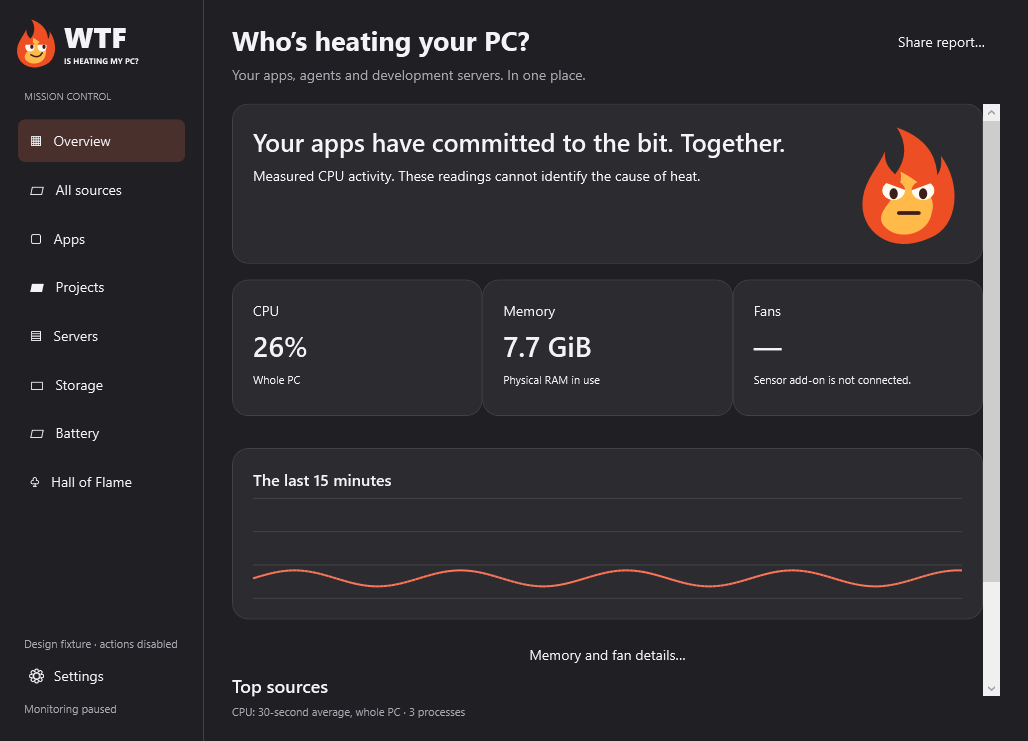
The Windows version is in development and testing. A public download is not available yet.
We’re checking installation, updates and behaviour on real PCs before making it available here. There’s no release date to promise just yet.
Your existing lifetime license will include Windows when it launches. Keep your key — no second purchase needed.
Manage license Explore the available Mac app ↗Mac at work. PC at home. Same little flame, same license. $3.99 once, with two activations in total.
WTF Is Heating My Mac?
macOS 26+ · Apple Silicon
Download for Mac Try every feature free for 14 days. No card.WTF Is Heating My PC?
Planned: Windows 11 x64 · Intel & AMD
Explore Windows Public download coming after testing.Mac + PC. Two Macs. Two PCs. Pick any two when Windows launches. Existing licenses include Windows at no extra cost. No subscription.
Already bought it? Keep your key. You can free up a slot in Manage license. Settings and history stay on each computer.
Not yet. The current build is a private development preview. Public availability follows signed installation and updates, Windows validation and testing on physical PCs. This page will have a clearly labelled Windows download when it is ready.
No. One $3.99 lifetime license covers two computers in total, across Mac and Windows. Existing purchases include Windows when it launches. Pick Mac + PC, two Macs or two PCs, and move an activation through Manage license. The Windows version will also offer a 14-day trial.
Planned support is Windows 11 x64 on Intel and AMD desktops and laptops, starting with version 24H2. Windows on ARM is outside the first release. The app will be available in English and Czech, with light and dark appearance.
Stopping unnecessary work can reduce CPU load. CPU activity alone does not measure temperature or prove the cause of heat. Fan readings need supported hardware and an optional sensor add-on. Missing readings stay unavailable.
The main app is designed to run as your normal user. Installing or updating the optional sensor add-on will require administrator approval. The other features work without that add-on.
The first Windows edition monitors their Windows host processes. It does not show individual processes inside WSL distributions or containers.
Measurements, process history, projects and achievements stay on your computer. The common licensing service handles purchase and activation; sharing a license does not sync history. This website uses no ad trackers or analytics scripts. Platform suggestions are made in your browser without sending device information to us. Vercel receives ordinary connection information when serving the website. Questions? Contact support.